
Self-host vx-cloud
vx-cloud (@vzn/vx-cloud) is a self-hosted CI platform, distinct
from core vx (@vzn/vx). It is not a companion process that runs
next to a workspace — it is a standalone service with accounts,
organizations, role-based access, and API tokens. You deploy it once,
register the first account (which becomes the instance admin), and your
workspaces connect to it for a shared remote cache, distributed
execution, analytics, and MCP.
The single verb is vx-cloud server. It runs one stateless process
that serves:
- the embedded dashboard SPA and the account/RBAC + Admin API
(
/v1/auth/*,/v1/admin/*), - the analytics API (
/v1/*, Postgres-backed), - the vx-native remote cache (
/v1/cache/:hash, S3-backed), - the distribution WebSocket channels (
/v1/agents), and - MCP for AI agents (
/mcp).
All state lives outside the process — run history in Postgres, artifact bytes in an S3-compatible bucket — so the container writes nothing to local disk and you can scale it out behind a load balancer.
Requirements
Section titled “Requirements”The platform refuses to boot without full configuration — there is no tokenless mode and no local-storage fallback. You need:
- Postgres (the identity + analytics system of record),
- an S3-compatible bucket (R2, AWS S3, MinIO, Garage, …) for artifacts, and
- a secret (≥ 32 chars) for session/token HMAC.
Quick start: docker compose up
Section titled “Quick start: docker compose up”The fastest path is the prebuilt image plus a Postgres and an S3 bucket.
CI publishes the image to the GitHub Container Registry on every push to
main and every release:
docker pull ghcr.io/vznjs/vx-cloud:latestA self-contained stack — app + Postgres + a MinIO bucket for local evaluation:
services:  app:    image: ghcr.io/vznjs/vx-cloud:latest    ports:      - '4321:4321'    environment:      DATABASE_URL: 'postgres://vx:vx@postgres:5432/vx'      # >= 32 chars — try: openssl rand -hex 32      VX_CLOUD_SECRET: '${VX_CLOUD_SECRET:?set VX_CLOUD_SECRET}'      # The public origin users reach the dashboard at. Use your real      # https:// URL in production (it flips session cookies to Secure).      VX_CLOUD_BASE_URL: '${VX_CLOUD_BASE_URL:-http://localhost:4321}'      # Artifact bucket — the MinIO below for eval; swap for R2/S3 in prod.      VX_CLOUD_S3_ENDPOINT: 'http://minio:9000'      VX_CLOUD_S3_BUCKET: 'vx-artifacts'      VX_CLOUD_S3_ACCESS_KEY_ID: 'vxminio'      VX_CLOUD_S3_SECRET_ACCESS_KEY: 'vxminiosecret'    depends_on:      postgres:        condition: service_healthy      createbucket:        condition: service_completed_successfully    restart: unless-stopped
  postgres:    image: postgres:16-alpine    environment:      POSTGRES_USER: vx      POSTGRES_PASSWORD: vx      POSTGRES_DB: vx    volumes:      - pgdata:/var/lib/postgresql/data    healthcheck:      test: ['CMD-SHELL', 'pg_isready -U vx -d vx']      interval: 5s      timeout: 3s      retries: 20
  # Demo object storage — replace with managed R2/S3 in production  # (set VX_CLOUD_S3_* on `app` and delete these two services).  minio:    image: minio/minio:latest    command: server /data --console-address ':9001'    environment:      MINIO_ROOT_USER: vxminio      MINIO_ROOT_PASSWORD: vxminiosecret    volumes:      - miniodata:/data    healthcheck:      test: ['CMD', 'mc', 'ready', 'local']      interval: 5s      timeout: 3s      retries: 20
  createbucket:    image: minio/mc:latest    depends_on:      minio:        condition: service_healthy    entrypoint: >      /bin/sh -c "      mc alias set vx http://minio:9000 vxminio vxminiosecret &&      mc mb --ignore-existing vx/vx-artifacts      "
volumes:  pgdata:  miniodata:
Bring it up:
VX_CLOUD_SECRET=$(openssl rand -hex 32) docker compose upOn boot the server reaches Postgres, applies migrations, probes the S3
bucket, then binds 0.0.0.0:4321. The repo also ships this stack at
packages/cloud/deploy/docker-compose.yml
(with a build stage for contributors).
First run: register → Admin
Section titled “First run: register → Admin”- Open
VX_CLOUD_BASE_URL(http://localhost:4321above) and register. The first account becomes the instance admin, and signup then closes — everyone else joins by invite. (SetVX_CLOUD_OPEN_SIGNUP=1to keep public signup open.) - In the Admin area, create an organization and a workspace,
and invite members — roles are
owner,admin,member, andviewer. - Mint an API token under Admin → Tokens. Tokens are prefixed
vxc_, carry an immutable trust tier (trustedoruntrusted), and can optionally be scoped to a single workspace. This is the token your CI andvx runpresent — the tier follows the token (see trust scopes). Tokens also carry a kind —ci(the default; machine surfaces + reads) oradmin(may also call the/v1/admin/*API) — and an optionalexpiresAt. The plaintext secret is shown exactly once, at mint; revocation is immediate (the server’s in-process auth memo is cleared, so a revoked bearer stops authenticating at once).
The Admin area is where all of this lives — members and their roles, invites, API tokens, and workspaces, tabbed across the top:
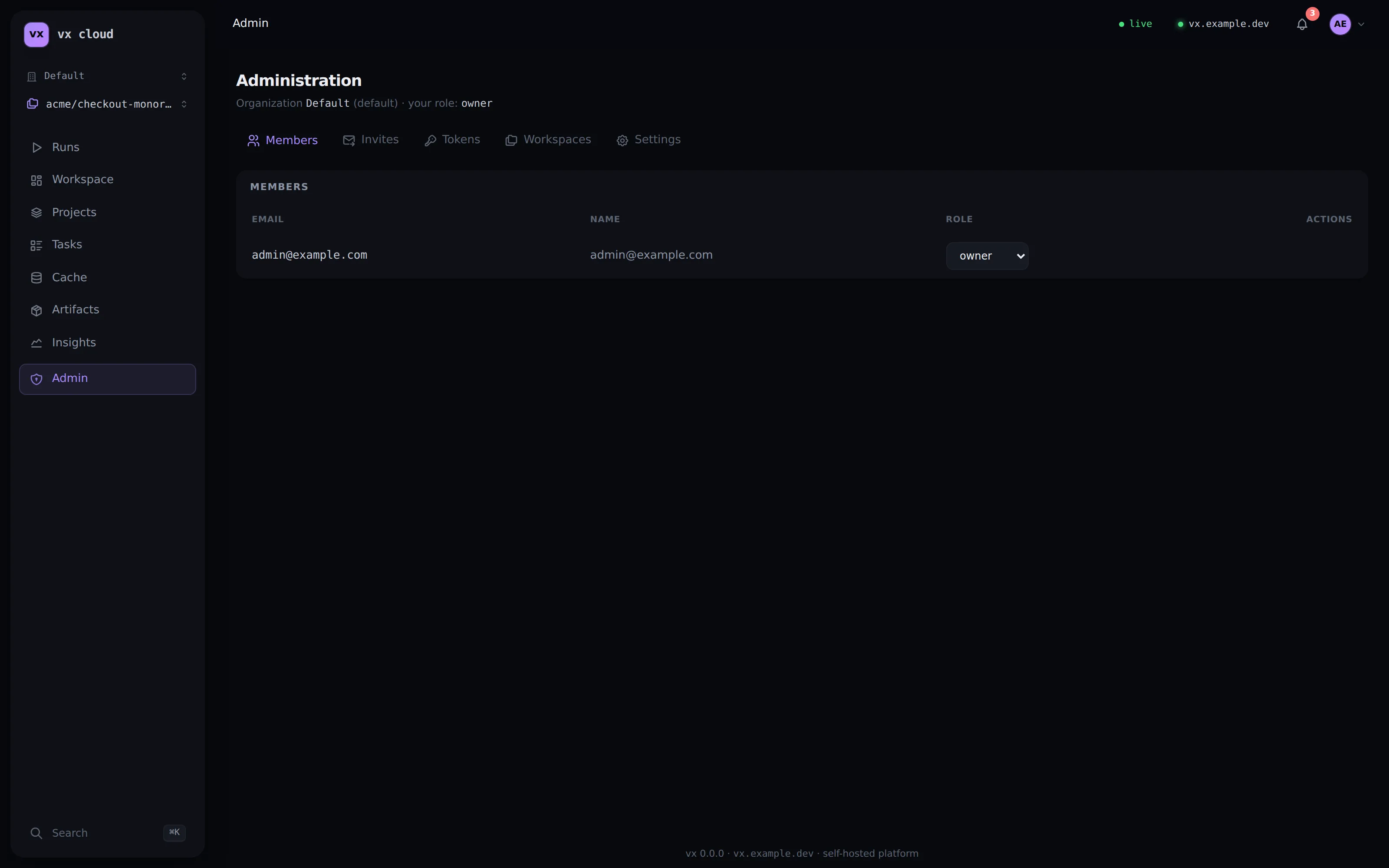
Roles gate the admin API and the dashboard’s Admin area (analytics
reads need viewer or better; the minimum is per action):
| Action | Minimum role |
|---|---|
| Read analytics, list members / workspaces, view the org | viewer (any membership) |
| Rename the org, manage members’ roles, create invites, mint / revoke tokens, create workspaces | admin |
| Manage owners (grant or revoke the owner role), invite an owner | owner |
| Create a new organization | instance admin (unless VX_CLOUD_OPEN_ORG_CREATE=1; the creator becomes its owner) |
The last owner can never be removed or demoted — the guard applies
to instance admins too. member is the default invite role; today it
carries the same read rights as viewer (the distinction is reserved
for finer write surfaces). An admin token can do everything an org
admin can except manage owners — owner management always requires an
owner’s session.
Configuration
Section titled “Configuration”Every setting is an environment variable. Boot validates the full set and refuses to start, listing every missing or invalid var at once.
| Variable | Required | Meaning |
|---|---|---|
DATABASE_URL | ✓ | postgres://user:pass@host:5432/db — the system of record |
VX_CLOUD_SECRET | ✓ | Session + API-token HMAC secret (≥ 32 chars) |
VX_CLOUD_BASE_URL | ✓ | The public origin (https://vx.acme.dev); https:// flips cookies to Secure |
VX_CLOUD_S3_ENDPOINT | ✓ | S3-compatible endpoint (R2 / AWS S3 / MinIO) |
VX_CLOUD_S3_BUCKET | ✓ | Artifact bucket (must already exist) |
VX_CLOUD_S3_ACCESS_KEY_ID | ✓ | S3 credentials |
VX_CLOUD_S3_SECRET_ACCESS_KEY | ✓ | S3 credentials |
VX_CLOUD_S3_REGION | SigV4 region (default auto) | |
VX_CLOUD_S3_PREFIX | Optional key prefix | |
VX_CLOUD_S3_PRESIGN_TTL | Presigned-GET TTL in seconds (default 300) | |
VX_CLOUD_PORT | Listen port (default 4321) | |
VX_CLOUD_RETENTION_DAYS | Analytics retention window (default 180) | |
VX_CLOUD_OPEN_SIGNUP | 1/true keeps public signup open (default: closed after the first admin) | |
VX_CLOUD_OPEN_ORG_CREATE | 1/true lets any member create orgs | |
VX_CLOUD_TLS_CERT / VX_CLOUD_TLS_KEY | PEM paths, both or neither — in-process TLS (HTTPS/1.1); see Transports | |
VX_CLOUD_ALLOW_ORIGIN | Extra browser origins allowed on WS/SSE handshakes (comma-separated; CSWSH defense) |
Partial S3 config (endpoint without bucket/credentials) is a boot-time hard error — the server never silently falls back to local storage.
Production notes
Section titled “Production notes”-
External object storage. Drop the
minio/createbucketservices and pointVX_CLOUD_S3_*at managed storage. Addressing is path-style with hand-rolled SigV4 (no AWS SDK), so any S3-compatible store works. Cloudflare R2:VX_CLOUD_S3_ENDPOINT: https://<account-id>.r2.cloudflarestorage.comVX_CLOUD_S3_BUCKET: vx-artifactsVX_CLOUD_S3_ACCESS_KEY_ID: ...VX_CLOUD_S3_SECRET_ACCESS_KEY: ...The bucket must be reachable from wherever
vx runexecutes (CI runners, dev machines): cache GETs redirect the client to a short-lived pre-signed bucket URL, so read traffic goes client → bucket, never through the controller. -
TLS + multiplexing. Front the server with a TLS-terminating reverse proxy for stable HTTP/2, or give it a cert directly (
VX_CLOUD_TLS_CERT+VX_CLOUD_TLS_KEY) for in-process HTTPS/1.1. Either way, setVX_CLOUD_BASE_URLto thehttps://origin so session cookies are markedSecure. See Transports just below. -
Scale out. The app is stateless (Postgres + S3 hold all state), so run several replicas behind the load balancer;
/healthis the pre-auth liveness probe. There is no volume to attach to the app container.
Data retention & background maintenance
Section titled “Data retention & background maintenance”History is partitioned by time — invocations and task_logs monthly,
task_runs (the high-volume table) weekly, each with a DEFAULT
catch-all so an out-of-range row is never dropped. A maintenance tick
at boot and daily creates the current + upcoming partitions and drops
those older than VX_CLOUD_RETENTION_DAYS (default 180). So
retention is automatic: raise or lower the variable and old history
ages out on the next tick. Maintenance is never boot-fatal — each
table’s failure is isolated and logged, and a row that landed in the
DEFAULT partition is recovered into its proper partition rather than
wedging the tick.
Large indexes are built outside the migration transaction by a
background convergence pass: after boot (and on the same daily tick)
the server builds any missing registry indexes with
CREATE INDEX CONCURRENTLY, partition by partition, serialized across
replicas by an advisory lock. A multi-minute index build therefore
never blocks serving or boot, a crash mid-build self-recovers on the
next pass (invalid leftovers are dropped and rebuilt), and replicas
don’t duplicate work. Operator signal: index maintenance: log lines.
Security model
Section titled “Security model”What the platform does with your credentials, for operators and anyone scripting the API:
- Passwords are hashed with argon2id (memory-hard) at rest. Login runs one verify per attempt even for unknown emails, so response timing doesn’t reveal whether an account exists.
- Login throttling — attempts are rate-limited per email (holds even when an attacker rotates IPs) and per IP+email, with backoff.
- Sessions are opaque 256-bit ids stored sha256-hashed, carried in
an HttpOnly cookie (marked
SecurewhenVX_CLOUD_BASE_URLis https), renewed on use with a 30-day sliding window; login rotates the session id and logout destroys it server-side. - CSRF — every session-authenticated mutation (auth, admin)
requires the custom header
x-vx-csrf: 1. If you script the admin API with a cookie (curl), send it or you’ll get 403s; bearer-token requests don’t need it. - Bearer-in-query (
?token=) is accepted only on the WS/SSE endpoints, where browsers can’t set headers. Everywhere else theAuthorizationheader is required. /versionintentionally answers 404 —GET /v1/metais the deliberate pre-auth identity surface (capability flags only, never tenant data).- Cross-origin WS/SSE handshakes from browsers are refused unless
allow-listed with
VX_CLOUD_ALLOW_ORIGIN(no-Origin CLI clients and same-origin pass). - Tenancy — every read is clamped to one
(org, workspace)derived server-side from the credential; anything outside it answers 404, never confirming existence. See the HTTP API reference for the per-route auth classes.
Transports: HTTP/2 & multiplexing
Section titled “Transports: HTTP/2 & multiplexing”The payoff is one connection, many requests: with HTTP/2 a client
multiplexes all its concurrent requests over a single connection instead of
opening a fresh TCP + TLS handshake per request. Priming a large graph then
costs one handshake, not hundreds — and it compounds with the
batch cache-existence probe
(POST /v1/cache/batch), which already collapses N per-hash HEADs into a
single request.
Bun has no single-port h1+h2 server today (Bun.serve is HTTP/1.1;
Bun’s node:http2 server is h2-only, with no HTTP/1.1 fallback for the
CLI/WebSocket clients). So HTTP/2 multiplexing lives at an edge proxy.
HTTP/2 at an edge proxy (recommended)
Section titled “HTTP/2 at an edge proxy (recommended)”Terminate TLS + HTTP/2 at the proxy and let the app speak plain HTTP/1.1 to it over the internal network — the universal production pattern, and where TLS usually already lives. The compose stack ships a ready Caddy edge (h1/h2) behind an opt-in profile:
VX_CLOUD_SECRET=$(openssl rand -hex 32) VX_CLOUD_BASE_URL=https://localhost \ docker compose -f packages/cloud/deploy/docker-compose.yml --profile edge up# open https://localhost — HTTP/2 is negotiated over ALPNThe Caddyfile global block is the whole story:
{  servers { protocols h1 h2 }}
vx.example.com {  reverse_proxy app:4321}
For a real domain, set VX_CLOUD_DOMAIN=vx.example.com, drop the
tls internal line so Caddy gets a Let’s Encrypt cert over ACME, and set
VX_CLOUD_BASE_URL to the matching https:// origin. Any h2-capable proxy
works the same way (nginx, Cloudflare, an L7 load balancer). WebSocket and
SSE/NDJSON streams bridge transparently through the proxy. (Do not run
in-process TLS and an edge proxy at once — pick one TLS terminator.)
In-process TLS (optional)
Section titled “In-process TLS (optional)”You can give the server a cert directly so it terminates TLS itself — a single-container deploy with no proxy:
VX_CLOUD_TLS_CERT=/etc/vx/cert.pemVX_CLOUD_TLS_KEY=/etc/vx/key.pemVX_CLOUD_BASE_URL=https://vx.example.comBoth paths are required together (setting one is a boot error) and must be readable at boot (a missing cert fails loud, never a silent no-TLS start). This serves HTTPS/1.1 — clients still reuse connections via keep-alive, but without h2 multiplexing; for that, put an HTTP/2 proxy in front.
HTTP + WS surface
Section titled “HTTP + WS surface”| Path | Purpose | Auth |
|---|---|---|
GET /health | Liveness probe | pre-auth |
GET /v1/meta | Identity + capability flags (auth: account, cacheWire, trustTiers, artifacts) | pre-auth |
POST /v1/auth/* | Register / login / logout / invites | session |
/v1/admin/* | Orgs, members, invites, tokens, workspaces | session (RBAC) |
GET /v1/* | Analytics reads (/v1/runs, /v1/invocations, /v1/cache/stats, /v1/why/…, …) | session or token |
POST /v1/ingest | Where run summaries land (the cloud() plugin’s push) | token |
GET/HEAD/PUT /v1/cache/:hash | The vx-native remote-cache wire | token |
POST /v1/cache/batch | Batch existence probe — N hashes in one round-trip | token |
POST /mcp | MCP server (JSON-RPC 2.0) for AI agents | session or token |
WS /v1/agents | Distribution agents | token |
GET /events, /stream | SSE / NDJSON event streams | session or token |
/v1/meta is pre-auth by design — it carries identity and capability
flags only, never tenant data. Every read is tenant-clamped: a
session is clamped to one org, a token to its org and (if workspace-scoped)
its workspace. There is no shared-secret / loopback auth model — the
token or session is the identity, and the server derives the tenant
from it.
Fork-PR trust scopes
Section titled “Fork-PR trust scopes”The artifact store is partitioned org/<orgId>/ws/<wsId>/<tier>, and the
tier is derived from the token on the server — never claimed by the
client. A trusted token reads and writes the trusted scope. An
untrusted token (mint one for fork PRs) reads trusted ∪ untrusted
but writes only untrusted, so a fork-PR job can warm off main’s
cache without being able to poison it. Artifacts are immutable (re-PUT of
an existing hash is rejected). Mint both tiers under Admin → Tokens; the
job presents whichever it holds. See Remote caching
and the cache-trust-scopes design note.
Connect a workspace
Section titled “Connect a workspace”From any workspace, connect to the deployed platform so its runs share the remote cache and feed the dashboard. Persist a named, per-user environment:
vx-cloud connect https://vx.example.com --name team --token vxc_...connect validates reachability + identity + the token before persisting
anything (tokens are stored 0600 and never printed). Manage environments
with vx-cloud env ls | use <name> | rm <name>, and clear the active one
with vx-cloud disconnect. --distribute opts the environment into
ambient distribution across an agent pool (see
Distributed CI); --no-use records it
without activating it.
Or wire it with environment variables (handy in CI):
export VX_CLOUD_URL=https://vx.example.comexport VX_CLOUD_TOKEN=vxc_... # the trusted token you mintedDeclare the plugin once so a connected workspace lights up the cache, analytics ingest, and distribution:
import { defineWorkspace } from '@vzn/vx'import { cloud } from '@vzn/vx-cloud/plugin'
export default defineWorkspace({ plugins: [cloud()] })
With no connection configured, cloud() declines every capability at zero
cost, so it’s safe to leave declared everywhere.
Installing the CLI
Section titled “Installing the CLI”The vx-cloud CLI ships as a prebuilt standalone binary per platform
(with the dashboard embedded) — npm i -g @vzn/vx-cloud gives you
vx-cloud with no Bun required. You need the CLI on the machines that
connect, run vx-cloud agent (distributed CI), or administer from the
terminal. For the server itself, the Docker image above is the turnkey
deployment.
See also: Dashboard,
Remote caching,
Distributed CI execution,
vx mcp — AI agents.