
vx Cloud overview
vx Cloud (@vzn/vx-cloud) is an independent, self-hosted CI
platform. It is a distinct product from core vx (@vzn/vx): core is
only a task runner that works fully offline, and vx Cloud is an optional
service your workspaces connect to for the things that need a server —
a shared cache, distributed execution, run analytics, and AI-agent access.
Core never depends on it. A plain vx run opens no socket, calls no
service, and needs no account. vx Cloud plugs in through the first-party
cloud() plugin (declared in vx.workspace.ts), which reaches core only
through its public plugin seams — so vx Cloud is one implementation you
could replace with your own. See
Core is provider-neutral.
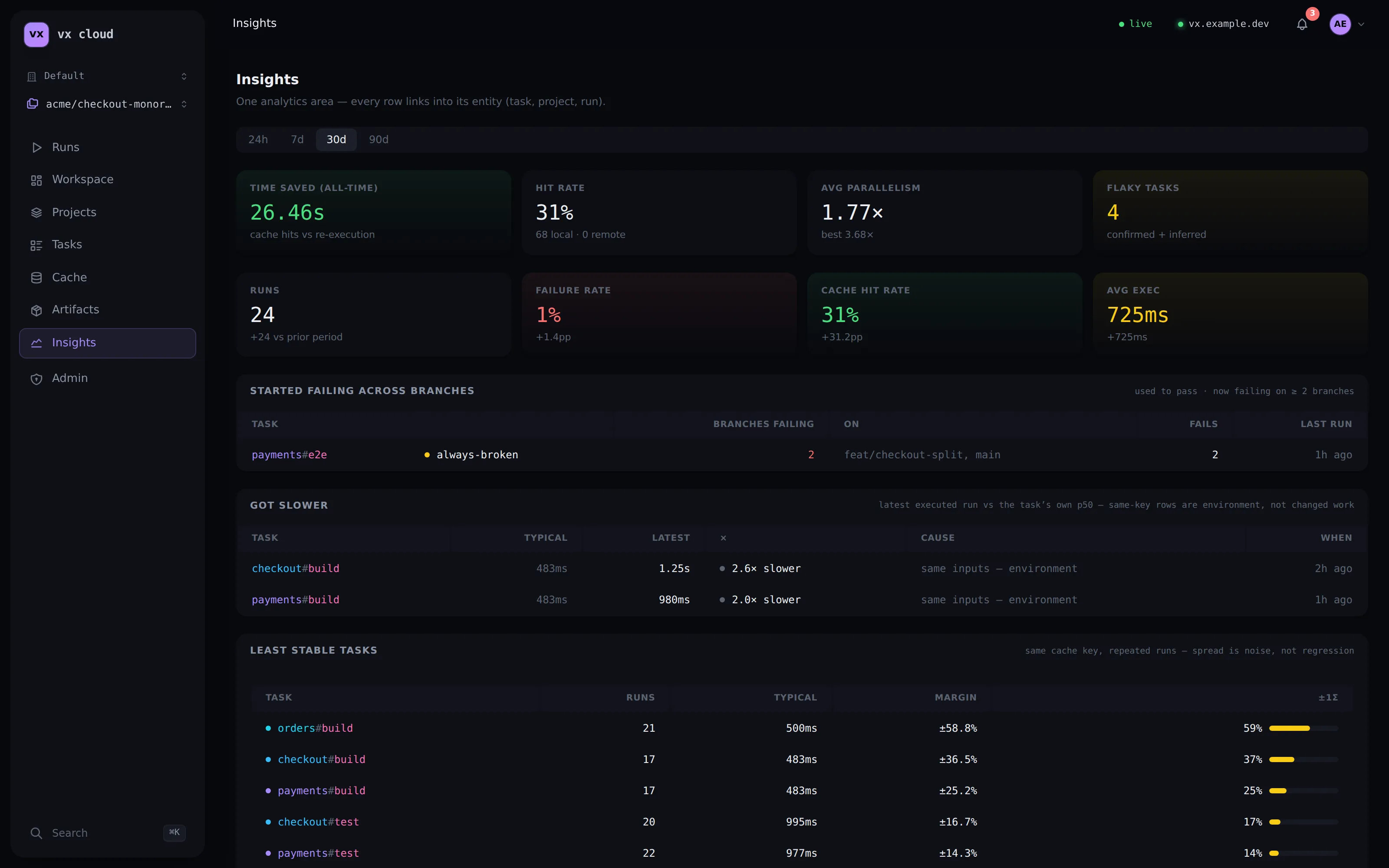
Every run streams into the dashboard — see the Dashboard tour for the full walkthrough.
What it is
Section titled “What it is”vx Cloud is a full platform, not a companion process:
- Accounts, RBAC, and orgs. Register an account, create
organizations and workspaces, invite members with roles (
owner,admin,member,viewer), and mint API tokens. - Postgres is the system of record. Identity, run/task history, and analytics all live in Postgres.
- S3-compatible artifact storage. The shared cache stores artifact bytes in an S3-compatible bucket (R2, AWS S3, MinIO, Garage, …) — the controller keeps zero artifact bytes at rest.
- A dashboard. A Solid SPA, embedded in the server binary and image, for runs, cache, projects/tasks, and insights.
- A shared remote cache. The vx-native
/v1/cachewire, trust-scoped so a fork PR can warm offmainwithout poisoning it. - Distributed execution. Fan a single
vx runacross an agent pool. - MCP over HTTP. A
POST /mcpendpoint so AI agents read the same analytics the dashboard shows. - CI reporting. Inside GitHub Actions a run appends a per-task
result table to the job summary, and — when handed
GITHUB_TOKEN— posts a real check run on the commit, both deep-linking the dashboard.
How it’s deployed
Section titled “How it’s deployed”The whole platform is one stateless process (vx-cloud server),
shipped as the ghcr.io/vznjs/vx-cloud container image and deployed with
docker compose alongside a Postgres and an S3 bucket. It refuses to
boot without full configuration — there is no tokenless mode and no
local-storage fallback. Register the first account (it becomes the
instance admin), create an org and a workspace, and mint the API tokens
your CI and developers present.
See Self-hosting for the one-docker compose up
stack and the full configuration reference.
How a workspace connects
Section titled “How a workspace connects”A workspace opts in by declaring the cloud() plugin and pointing it at a
deployment — either a persisted, named connection or two environment
variables:
import { defineWorkspace } from '@vzn/vx'import { cloud } from '@vzn/vx-cloud/plugin'
export default defineWorkspace({ plugins: [cloud()] })vx-cloud connect https://vx.example.com --token vxc_...# or, in CI:export VX_CLOUD_URL=https://vx.example.comexport VX_CLOUD_TOKEN=vxc_...With no connection configured, cloud() declines every capability at zero
cost, so it’s safe to leave declared everywhere. One connection drives all
three capabilities — analytics ingest, the remote cache, and distributed
execution. The trust tier follows which token you present (the server
derives it from the bearer, never a client claim).
In this section
Section titled “In this section”- Self-hosting — deploy the platform with docker compose (Postgres + S3), register the first admin, mint tokens.
- Dashboard — the runs, cache, and insights UI.
- Distributed CI — fan a
vx runacross an agent pool. - Remote caching — connect a shared cache, tokens, and trust scopes.
- MCP — the
POST /mcpplatform endpoint for AI agents. - CLI — the
vx-cloudbinary:server,connect/env,agent,dev. - Wire protocol — tail the live run event stream over SSE / NDJSON.
- HTTP API reference — every
/v1endpoint: auth classes, parameters, tenancy clamps.