
Remote caching
A local cache makes your repeat runs instant with zero setup — it’s on
by default for every vx run. A shared cache extends that across
machines: CI restores what a teammate already built, and a fresh clone is
fast on its first run. Sharing is the only part that needs a server.
vx Cloud is the first-party shared cache. (Core exposes a provider-neutral seam, so you can also bring your own backend — see Remote caching (core) and Core is provider-neutral.)
The one connection
Section titled “The one connection”Sharing a cache means connecting to a vx Cloud deployment — the
self-hosted platform that hosts the artifact
store (plus the dashboard and, optionally,
distributed execution). One connection
provides all of it. The remote cache is internal to that connection:
connect a platform and every vx run reads and writes its artifact store
automatically — there is no separate cache URL or token to configure.
Persist the connection once ($VX_CLOUD_TOKEN is an API token you minted
under Admin → Tokens on the platform):
vx-cloud connect https://vx-cloud.example.com --token "$VX_CLOUD_TOKEN"or set it with two environment variables (handy in CI):
export VX_CLOUD_URL=https://vx-cloud.example.comexport VX_CLOUD_TOKEN=your-tokenEither way, vx run now layers the platform’s cache on top of the local
one (local first, then remote, then execute; remote hits hydrate the local
cache). Don’t have a server yet? It’s one docker compose up — see
Self-hosting.
The connection variables
Section titled “The connection variables”| Variable | Purpose |
|---|---|
VX_CLOUD_URL | The deployment origin. Drives the cache, analytics ingest, and distributed execution. |
VX_CLOUD_TOKEN | Bearer token for a trusted context (reads and writes the trusted cache scope). |
VX_CLOUD_PR_TOKEN | Bearer token for a fork-PR context (reads trusted, writes only untrusted — see below). |
That’s the whole surface. The cache, the dashboard, and distributed execution all ride this one connection — there is no separate cache-only variable.
Trust follows the token
Section titled “Trust follows the token”The cache is trust-scoped, and the tier is decided by which token you present — the server derives it from the bearer, never from a client claim:
VX_CLOUD_TOKEN— a trusted context (yourmainbuilds, protected branches). Reads and writes the trusted scope.VX_CLOUD_PR_TOKEN— a fork-PR context. Reads the trusted scope (so the PR still warms offmain) but writes only the untrusted scope, so a fork can never poison a trusted build. It’s safe to expose.
There’s no separate trust flag and no autodetection: a fork PR simply doesn’t have your repo secrets, so the only token it holds is the PR token — which token you have is the tier. Present the PR token from fork-PR jobs; present the trusted token everywhere else.
Per-PR isolation inside the untrusted tier
Section titled “Per-PR isolation inside the untrusted tier”Untrusted writes are additionally partitioned by a sub-scope, so one
PR’s cache can’t feed another PR’s builds. The client derives a stable
id for the current pull request — VX_CACHE_SCOPE overrides; otherwise
the CI context supplies it automatically (pr-<n> from a GitHub
pull_request ref, the head branch on a branch push, mr-<iid> on a
GitLab MR) — and sends it as the x-vx-cache-scope header. Reads
resolve the PR’s own sub-scope first, then trusted, so a PR warms
off main plus its own earlier pushes, never a sibling PR’s.
The header is untrusted-tier-only and server-sanitized: a trusted
principal ignores it entirely, hostile values (.., path separators,
another scope’s name) collapse to a shared segment, and it only ever
narrows where inside untrusted/ a write lands — no header value can
widen access or reach the trusted scope. Outside a PR the untrusted
tier falls back to one shared sub-scope.
It never breaks your build
Section titled “It never breaks your build”The remote cache is fully optional at runtime. Any failure — a 500, a
timeout, an auth error, a corrupt artifact — degrades to a local cache miss
and the run continues. A remote outage slows you down; it never fails you.
Remote lookups also fire concurrently in the background before scheduling,
so network latency overlaps execution: vx probes all stable cache keys in
one POST /v1/cache/batch request, prefetches only the hits, and
marks the misses absent so their lazy reads skip the network entirely.
Against an older server without the batch endpoint it degrades to
per-hash probes (see Wire protocol).
Artifact integrity
Section titled “Artifact integrity”Every artifact upload carries an x-vx-digest header — a structural hash
over the artifact bytes. The server stores it and echoes it back on
download, and the client verifies it against the received bytes: a
corrupt store, a truncating proxy, or a bad disk degrades to re-execution —
it never restores corrupt outputs. This is always on; there is nothing to
configure.
Set the connection as CI secrets and you’re done — see
Continuous integration for a complete GitHub Actions
example. Pair the shared cache with --affected and most PRs only execute
the packages they actually changed; everything else restores from a
previous build.
See it pay off
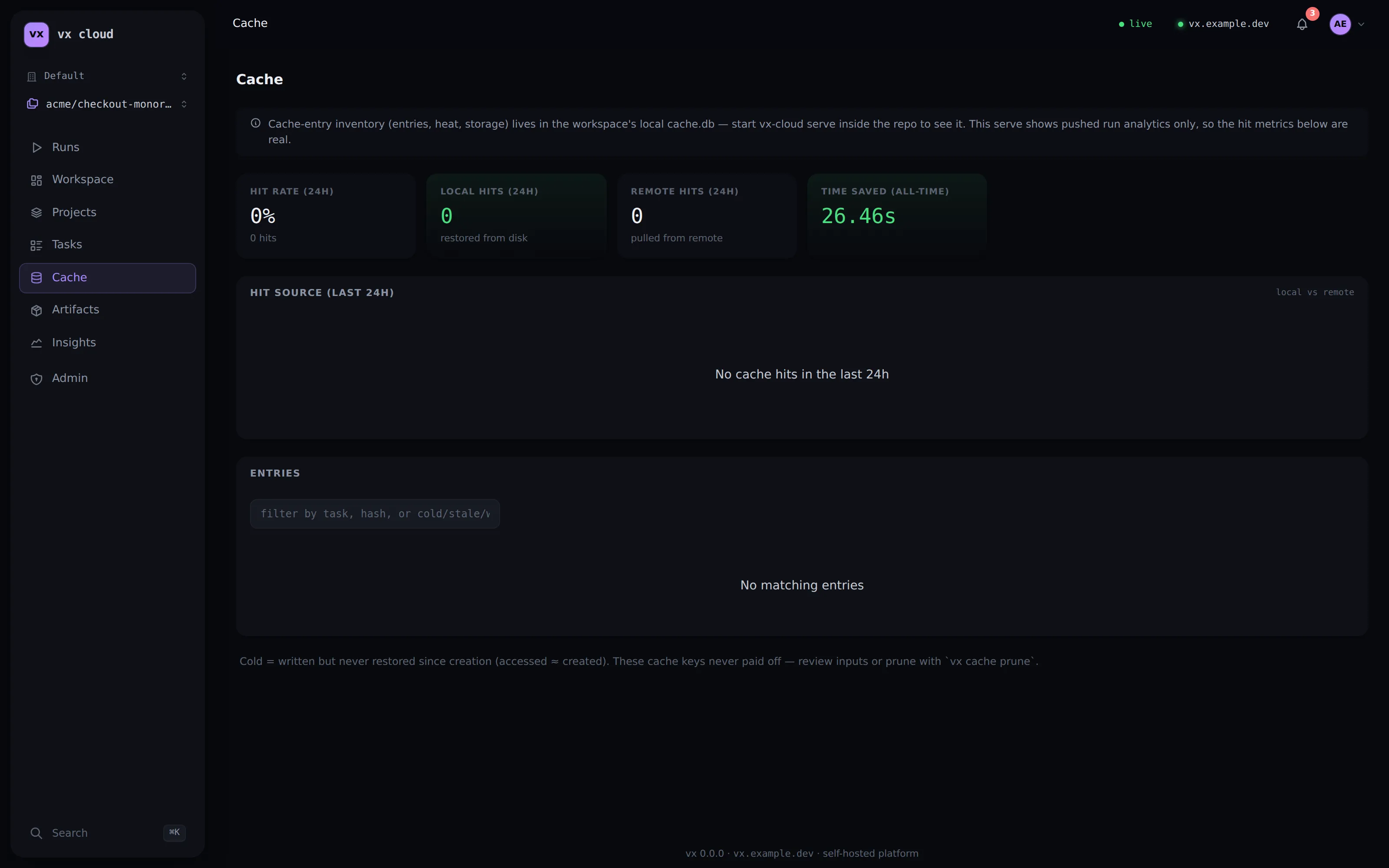
Section titled “See it pay off”The dashboard’s Cache view turns the shared cache into numbers: the hit rate, how many hits came from a local vs a remote restore, and the wall-clock time saved — so the value of the connection is visible, not assumed.
Next steps
Section titled “Next steps”- Self-hosting — stand up the server in one
docker compose up. - Distributed CI — fan a run across an agent pool over the same connection.
- Caching deep dive — the artifact format and the layered cache.
- HTTP API reference — the cache wire routes
beside the rest of the
/v1surface.